
Podcast to YouTube Video Plans with GapCoach
Podcasters don’t usually struggle to find content. They struggle to turn great episodes and guest discussions into YouTube videos that earn clicks, hold attention, and grow a channel—particularly YouTube.
That’s exactly where GapCoach comes in.
Pick the YouTube angle that’s specific, searchable, and clickable.
Tight opening strategy so viewers stay through the value.
Structure, title/thumbnail direction, and an outline you can film.
Turn ideas into videos—fast
GapCoach transforms trending ideas and content gaps from GapTube.ai into clear, ready-to-produce video plans.
In minutes, you’ll get:
- the best angle for your topic
- a tighter hook that earns retention
- a video structure you can film immediately
- direction for title + thumbnail
- an actionable outline that reduces “what do I say next?”
Turn Podcast Ideas Into YouTube Videos (Fast)
GapCoach — Turn Ideas Into Videos is your AI YouTube strategy coach that transforms trending ideas and content gaps from GapTube.ai - YT Research Tool into clear, ready-to-produce video plans.
If you’re expanding from podcasting to YouTube, this pillar page will walk you through a repeatable workflow—from episode → content concept → upload-ready plan.
What GapCoach helps you do
- the best angle for your topic
- a tighter hook that earns retention
- a video structure you can film immediately
- direction for title + thumbnail
- an actionable outline that reduces “what do I say next?”
This is how you go from “interesting discussion” to “viewer-winning video.”
Why Podcast Creators Are Moving to YouTube (and Winning)
YouTube is increasingly reshaping how podcast creators distribute and grow. Instead of relying only on downloads and subscriptions, video lets you:
capture attention faster (thumbnail + hook)
reach viewers who don’t know your podcast yet
remix moments into clips, segments, and series
build channel authority around a searchable content library
In other words: your podcast has “raw material”—YouTube rewards packaging.
GapCoach helps you package that material into YouTube-native concepts that match how audiences discover and watch.
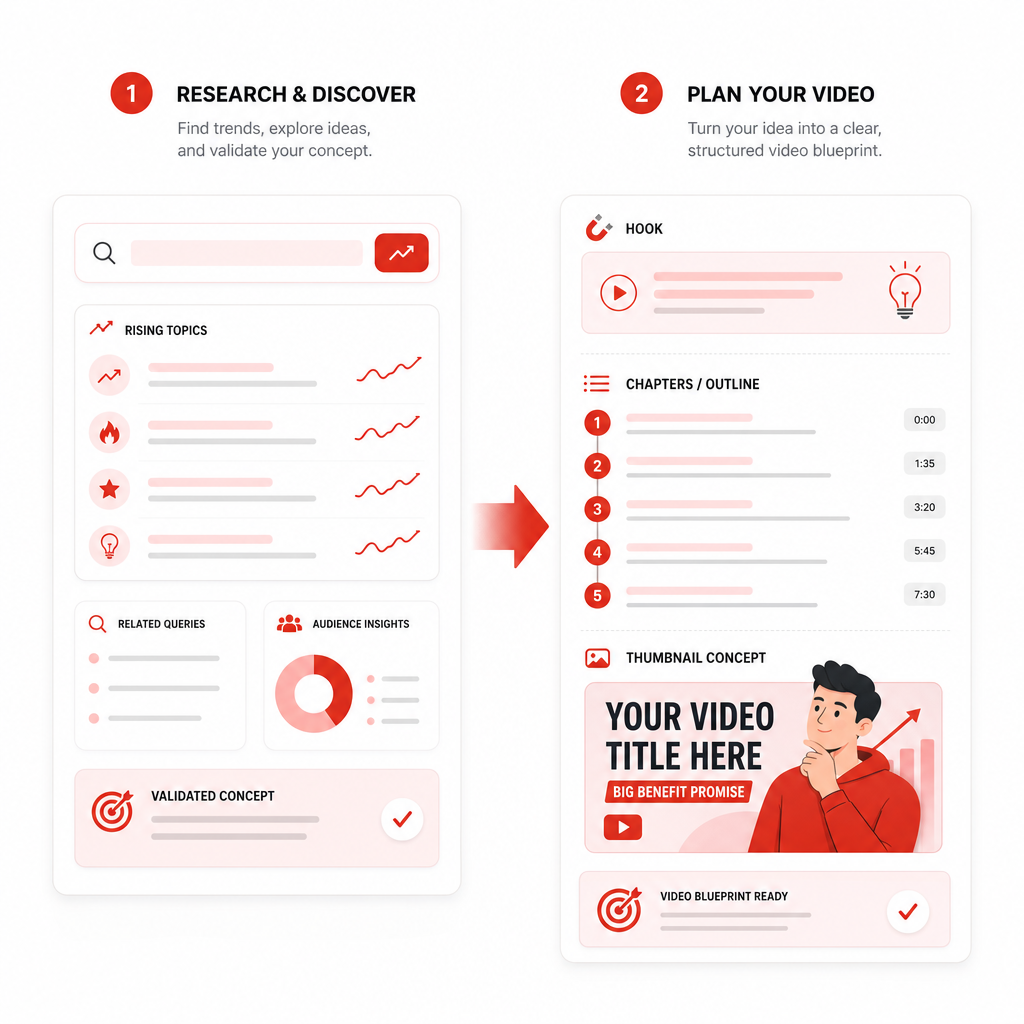
The GapTube.ai → GapCoach Workflow (Simple and Powerful)
Most creators waste time jumping between ideas, notes, and scripts. Use this two-step system:
Find the right YouTube opportunity with GapTube.ai
GapTube.ai scans real-time trends worldwide, identifies content gaps in your niche, and generates actionable video ideas in over 70 languages.
- trending topic directions
- keyword-rich opportunities
- “what to cover next” inspiration based on what people are searching for
Turn that opportunity into an upload-ready plan with GapCoach
GapCoach then guides you through turning the opportunity into:
- a specific angle
- a strong hook strategy
- a clear video structure
- title and thumbnail direction
- an outline you can produce quickly
What to Convert From Your Podcast to YouTube
If you’re building on an existing podcast, you already have multiple content formats available. Here are the easiest (and most YouTube-friendly) conversions.
1) Whole episodes → “Chaptered” YouTube videos
- Turn long-form episodes into a video that feels modular:
- intro promise (what the viewer will learn)
- 3–6 chapters matching key themes
- a final takeaway (what to do with the information)
2) Guest topics → “Why this matters” YouTube explanations
Guests bring authority and specificity. Use YouTube to distill them into:
- a viewer problem statement
- one core insight from your guest
- a practical example from the episode
3) Trending discussions → “Hot take with proof” series
YouTube rewards relevance. Take the trending moment and add:
- context (what’s happening and why)
- evidence (what you learned from the episode)
- actionable steps (what viewers can do today)
4) Podcast moments → short-form clips that feed long-form
Clip your strongest lines—but don’t stop there. Each clip should point back to:
- a full “deep dive” video plan
- a related “part 2 / part 3” concept
- a weekly theme series
GapCoach helps you connect these pieces into coherent channel planning.
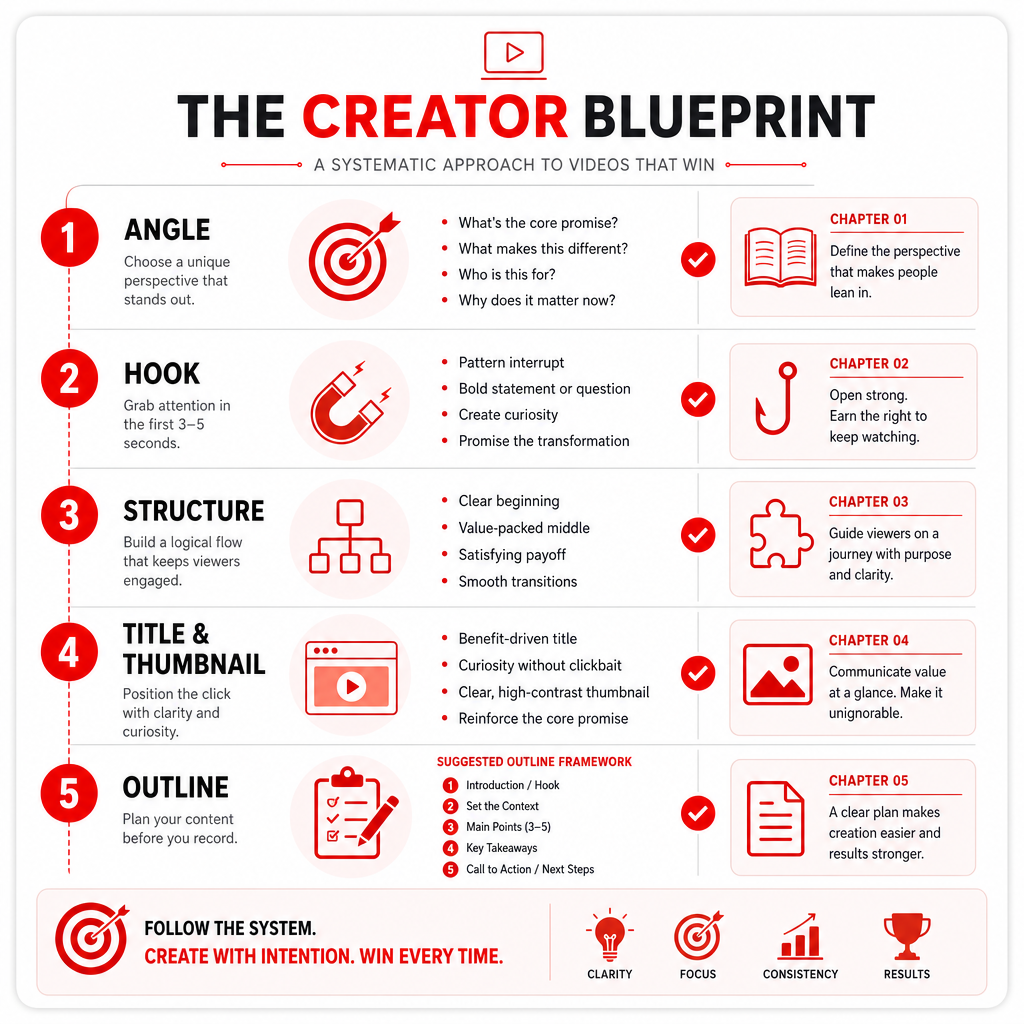
Your YouTube Creator Blueprint (Idea → Video Plan)
Here’s the GapCoach-driven plan you can reuse every time you publish.
1) Choose the right angle (not just the topic)
Topic: “Productivity”
Angle: “How to stop starting over (a system for finishing)”
GapCoach helps you select angles that feel specific, searchable, and clickable—so the video isn’t “yet another productivity video.”
Quick prompt: What unique result do viewers get after watching your episode/your guest’s insight?
2) Write a hook designed for retention (first 10 seconds)
Your hook should answer one of these immediately:
- “Why should I care right now?”
- “What will I learn that I can’t get elsewhere?”
- “What’s the mistake everyone makes with this?”
Use GapCoach to tighten your opening so viewers stay through the value.
3) Structure the video so it feels easy to follow
A YouTube video needs momentum. A strong structure typically includes:
- Hook + promise
- 3 key points (each tied to a chapter or segment)
- a “real example” drawn from your episode
- recap + next step
GapCoach turns your idea into a structure you can film immediately.
4) Title + thumbnail direction (so people click)
Titles should be:
- specific
- clear about the benefit
- aligned with your angle
Thumbnails should match the emotional promise of the title—bold, simple, and consistent with the video’s payoff.
GapCoach guides you toward a direction that connects what the viewer expects with what the viewer actually gets.
5) Build an actionable outline (no more “script panic”)
Your outline should include:
- section headers (chapters)
- key talking points for each section
- transitions (how you move to the next part)
- where to add examples from your podcast episode
- a final “do this next” takeaway
This is how you go from “idea” to upload faster.
Where “YouTube Creators Hub” Fits In
If you’re actively expanding to YouTube, it helps to align with official YouTube creator resources and tooling. **YouTube Creators Hub** (as referenced in creator-focused listings and guides) can support how you think about planning, growth, and publishing best practices.
Use it as a “big picture” reference while GapCoach handles the practical, episode-to-video execution:
- You pick the opportunity (GapTube.ai)
- GapCoach creates the plan to publish
- You use creator resources to improve consistency and iteration
Monetization & Distribution: Keep Your Momentum (Not Just Your Ideas)
When creators integrate YouTube into distribution workflows, the goal isn’t only reach—it’s sustainable performance and monetization. Press and industry updates around creator distribution tools and YouTube integration highlight how emerging creators grow reach while maintaining monetization.
GapCoach supports that same mindset: your video planning is built for repeatable output—so you can publish with less friction and learn faster from what performs.
Privacy Policy (What You Should Know as a Creator)
If you’re using AI tools for content planning and research, it’s important to understand how your information is handled. While implementations differ, look for a clear Privacy Policy that explains:
- what data is collected (if any)
- how inputs are used to generate outputs
- whether data is shared with third parties
- user controls and retention practices
GapTube.ai and GapCoach are built to help creators plan and produce faster—so make sure you review the tool’s Privacy Policy before connecting accounts or providing sensitive details.
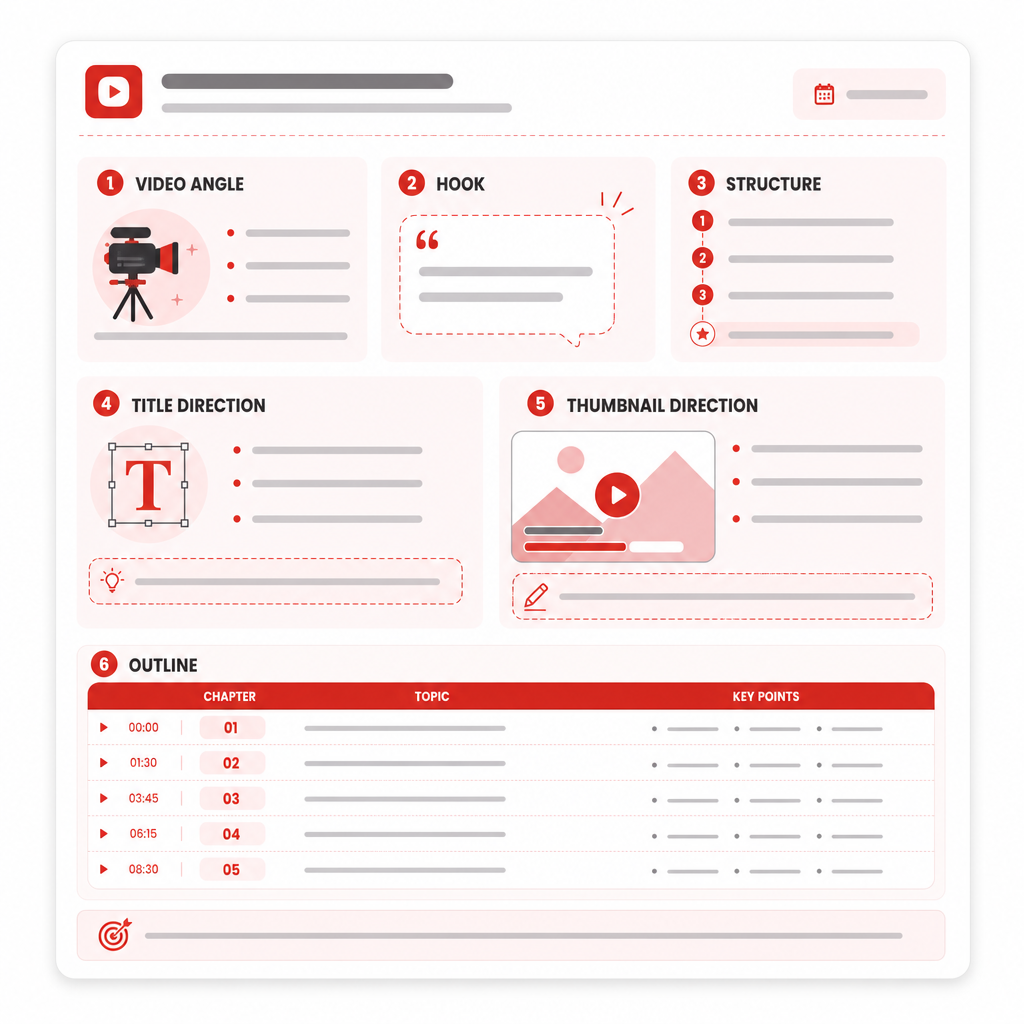
The “Ready-to-Produce” Sample Output (Example)
Here’s what GapCoach transforms your idea into—format shown for clarity:
Video Angle: “Turning guest expertise into a step-by-step viewer system”
Hook (10 sec): “Most people misunderstand this guest’s advice—here’s the fix that makes it work.”
Structure:
- What viewers get from this video (promise)
- The #1 misconception from the episode
- Framework step 1–3
- Example from your guest discussion
- Recap + next action (what to do after watching)
Title Direction: “Stop doing X—Use this 3-step system instead (from [Guest/Topic])”
Thumbnail Direction: big bold text: “3-STEP FIX” + key emotion image
Outline:
- Section headings + bullet points for each chapter
- where to add a direct quote moment
- CTA back to a related “deep dive” episode
That’s the difference between talking about content and publishing content.
Convert Your Podcast to YouTube This Week (Simple Publishing Plan)
If you’re new (or restarting) on YouTube, try this week-by-week plan:
Day 1: Pick one episode and identify the best moment(s)
Day 2: Use GapTube.ai to match your topic to YouTube trends + gaps
Day 3: Run the opportunity through GapCoach to get your video plan
Day 4: Record using your outline (chapters included)
Day 5: Create title + thumbnail direction, publish
Day 6–7: Clip top moments into short-form and reference the long-form video
Consistency beats complexity—GapCoach helps you stay consistent.
Get GapCoach to Turn Content Opportunities Into Video Plans
Ready to stop “idea hunting” and start publishing?
GapCoach — Turn Ideas Into Videos helps you go from:
- trending topic + content gap (GapTube.ai)
- hook + structure + title direction + outline (GapCoach)
Start turning your episodes into a plan you can film.
Use GapTube.ai to pick the opportunity, then let GapCoach create the plan to publish.
Frequently Asked Questions
Is GapCoach only for podcast-to-YouTube creators?
GapCoach is designed for creators who need to turn content opportunities into YouTube-ready plans—podcast creators are a perfect fit because they already have strong raw material (episodes, guests, discussions).
Do I need to be an expert on YouTube to use GapCoach?
No. GapCoach guides you through selecting angles, improving hooks, and building outlines so you can publish faster without guessing.
How does YouTube Creators Hub relate to this?
Use YouTube Creators Hub for strategy context and creator best practices, while GapTube.ai + GapCoach handle your specific workflow: research → video plan → ready-to-produce outline.
Where can I find details about Privacy Policy?
Check the AI tool’s official Privacy Policy for information about data handling, retention, and user controls.