
YouTube Automation—Repurpose Long Videos into Shorts
Growing YouTube channels don’t usually lose because they can’t make videos—they lose because they publish too slowly and reuse too little.
Use GapTube.ai as your YouTube keyword tool for topic research, then pair it with Vizard Clips to turn one long video into dozens of ready-to-post clips for Shorts, TikTok, Reels, and LinkedIn.
Publish videos people actually want with trend and content gap research.
Every long video keeps generating reach through clips across social platforms.
Turn one long video into dozens of ready-to-post clips.
Why Repurposing Matters More Than Ever for YouTube Growth
YouTube Shorts aren’t just extra content—they’re a scalable discovery channel.
Increase output
Increase output without starting from scratch.
Test more angles
Test hooks, topics, and story beats using clip variations.
Reach viewers
Reach viewers where they already watch: Shorts and other platforms.
Support insights
Support SEO and Analytics insights by comparing what performs across formats.
The real advantage compounds: one long upload → many shorts → more data → better future long-form videos.
Discover topics that can win
Before you repurpose, you need the right raw material: videos with demand.
GapTube.ai scans real-time trends worldwide, identifies content gaps in your niche, and turns them into actionable video ideas—across 70+ languages. You can also discover what’s already working before planning the next long-form upload.


Record once—extract moments that drive clicks
Once your long-form video is published, or even while editing, Vizard Clips helps you extract key moments and convert them into short, shareable clips quickly.
It’s built for creators who want speed without sacrificing the ready-to-post experience. Learn how Vizard Clips can multiply your content output from one long video.
Result: You stop treating repurposing like a second job.
Research → Create → Multiply → Optimize
This is the end-to-end workflow designed for growing YouTube channels.
Research with GapTube.ai
Use real-time trend scanning, niche content gaps, and keyword-rich guidance to choose stronger source material.
Create the long video
Build one long-form video from topics with demand, then use that video as the raw material for short-form output.
Multiply with Vizard Clips
Convert long-form moments into clips and ready-to-post short content across platforms.
Optimize the next cycle
Track performance, then loop learnings back into your next long-form upload plan.
Automate the clip pipeline and improve every cycle
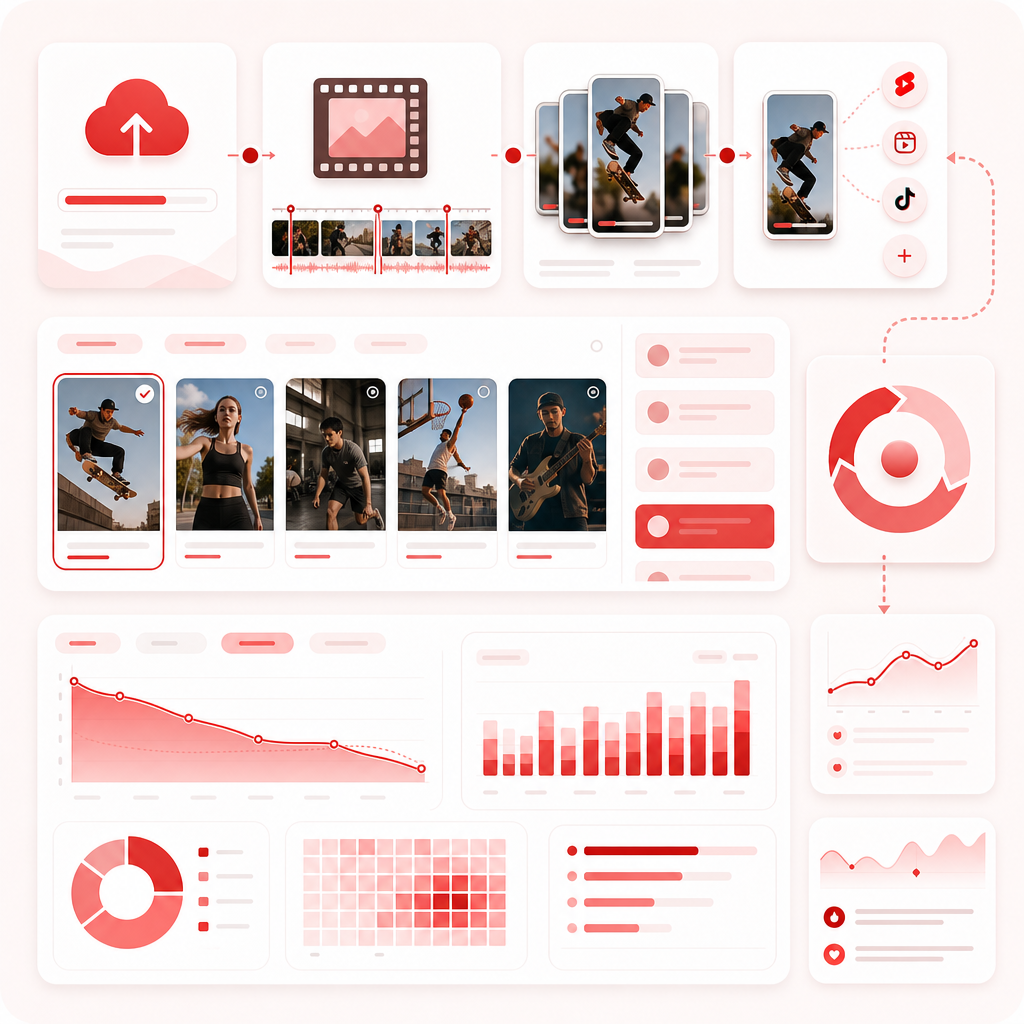
Instead of manually scrubbing a 30–90 minute video, cutting dozens of segments, formatting for each platform, and rewriting captions repeatedly, use tools to compress the workflow so you can publish consistently.
Think of it as upload → clip extraction → distribution-ready content → review + optimize. Repurposing is not just volume; it is also data.
Track performance on
- Shorts views and retention
- Click-through indicators where applicable
- Which clip hooks work best
- Which topics keep earning repeat engagement
Use those learnings with GapTube.ai topic research and your videos performance insights to make better decisions, not just more posts.
Where AI Video Tools Fit
When building a repurposing stack, think about what each tool category does best.
AI video editing
InVideo-style workflows focus heavily on editing assistance, templates, and repurposing-friendly production workflows.
AI video generation
Zapier-style AI generator workflows emphasize automation, multi-tool workflows, idea variation, and content drafts.
AI voice, translation, and generator tools
Castmagic-style workflows often focus on transforming content quickly and improving localized or republished output, depending on the feature set.
The key distinction for your growth stack
To multiply content output from long-form, you need moment extraction from your existing video, clip formatting for social platforms, and a repeatable output pipeline. That is what Vizard Clips is positioned to do—pairing perfectly with GapTube.ai for topic selection.
A Practical Tool Stack for Growing Channels
If you’re searching for explore apps to build a creator growth system, start with a simple stack that makes your pipeline predictable—not complicated.
Research + Repurpose
GapTube.ai - YT Research Tool: Find winning topics, keywords, and content gaps with real-time trend scanning.
Vizard Clips: Turn each long-form video into ready-to-post short clips.
Editing + Automation
- AI editor/templates for polishing and quick formatting.
- AI workflow automation to connect stages of your pipeline.
- Generator/transform tools if you’re scaling variants or localization.
Why Creators Choose the GapTube.ai + Vizard Clips Combo
This pairing solves both halves: winning ideas and maximum reuse.
The common struggle
- They publish long videos, but Shorts don’t happen.
- They repurpose, but it takes too long.
- They guess topics, then spend weeks editing.
- They post, but don’t learn what actually works.
GapTube.ai = winning ideas
Discover what to make using real-time trend scanning, niche content gaps, and keyword-rich guidance.
For more planning support, use GapCoach to turn ideas into videos.
Vizard Clips = maximum reuse
Extract more value from every video by converting long-form moments into clips, creating ready-to-post short content fast, and multiplying output across platforms.
One long upload can become dozens of clips—without burning your schedule.
Frequently Asked Questions
Is Vizard Clips only for YouTube Shorts?
Do I need to use GapTube.ai before Vizard Clips?
How does this improve SEO and Analytics?
Will this replace my editing?
Turn Every Long Video into Dozens of Clips
If you want to grow faster, stop making content once and start making it work for you repeatedly. Use GapTube.ai to discover trending topics and content gaps, then use Vizard Clips to multiply your output into short clips—ready to post.
Start Your Project